Ubuntu20.04에서 VSCode C/C++ 개발환경 구축하기

참고자료
https://webnautes.tistory.com/1158
Visual Studio Code에서 C/C++ 프로그래밍( Windows / Ubuntu)
Windows와 Ubuntu 환경에 설치된 Visual Studio Code에서 C/C++을 컴파일하고 실행시키는 방법에 대해 설명합니다. 테스트에 사용한 운영체제 버전은 Windows 10과 Ubuntu 20.04입니다. Visual Studio Code 버전에..
webnautes.tistory.com
1. 리눅스 필수 개발코드 다운로드
리눅스에서 C/C++ 등 개발툴을 컴파일하기 위한 필수 컴파일러와 유틸리티들을 설치한다.
swift@swift-HP-Pavilion-dv6-Notebook-PC:~/Desktop$ sudo apt-get install build-essential
[sudo] password for swift:
Reading package lists... Done
Building dependency tree
Reading state information... Done
The following package was automatically installed and is no longer required:
  libllvm11
Use 'sudo apt autoremove' to remove it.
The following additional packages will be installed:
  binutils binutils-common binutils-x86-64-linux-gnu dpkg-dev fakeroot g++
  g++-9 gcc gcc-9 libalgorithm-diff-perl libalgorithm-diff-xs-perl
  libalgorithm-merge-perl libasan5 libatomic1 libbinutils libc-dev-bin
  libc6-dev libcrypt-dev libctf-nobfd0 libctf0 libfakeroot libgcc-9-dev
  libitm1 liblsan0 libquadmath0 libstdc++-9-dev libtsan0 libubsan1
  linux-libc-dev make manpages-dev
Suggested packages:
  binutils-doc debian-keyring g++-multilib g++-9-multilib gcc-9-doc
  gcc-multilib autoconf automake libtool flex bison gcc-doc gcc-9-multilib
  gcc-9-locales glibc-doc libstdc++-9-doc make-doc
The following NEW packages will be installed:
  binutils binutils-common binutils-x86-64-linux-gnu build-essential dpkg-dev
  fakeroot g++ g++-9 gcc gcc-9 libalgorithm-diff-perl
  libalgorithm-diff-xs-perl libalgorithm-merge-perl libasan5 libatomic1
  libbinutils libc-dev-bin libc6-dev libcrypt-dev libctf-nobfd0 libctf0
  libfakeroot libgcc-9-dev libitm1 liblsan0 libquadmath0 libstdc++-9-dev
  libtsan0 libubsan1 linux-libc-dev make manpages-dev
0 upgraded, 32 newly installed, 0 to remove and 0 not upgraded.
Need to get 34.4 MB of archives.
After this operation, 156 MB of additional disk space will be used.
Do you want to continue? [Y/n] Y
Get:1 http://kr.archive.ubuntu.com/ubuntu focal-updates/main amd64 binutils-common amd64 2.34-6ubuntu1.1 [207 kB]
Get:2 http://kr.archive.ubuntu.com/ubuntu focal-updates/main amd64 libbinutils amd64 2.34-6ubuntu1.1 [475 kB]
Get:3 http://kr.archive.ubuntu.com/ubuntu focal-updates/main amd64 libctf-nobfd0 amd64 2.34-6ubuntu1.1 [47.1 kB]
Get:4 http://kr.archive.ubuntu.com/ubuntu focal-updates/main amd64 libctf0 amd64 2.34-6ubuntu1.1 [46.6 kB]
Get:5 http://kr.archive.ubuntu.com/ubuntu focal-updates/main amd64 binutils-x86-64-linux-gnu amd64 2.34-6ubuntu1.1 [1,613 kB]
Get:6 http://kr.archive.ubuntu.com/ubuntu focal-updates/main amd64 binutils amd64 2.34-6ubuntu1.1 [3,380 B]
Get:7 http://kr.archive.ubuntu.com/ubuntu focal-updates/main amd64 libc-dev-bin amd64 2.31-0ubuntu9.2 [71.8 kB]
Get:8 http://kr.archive.ubuntu.com/ubuntu focal-updates/main amd64 linux-libc-dev amd64 5.4.0-81.91 [1,129 kB]
Get:9 http://kr.archive.ubuntu.com/ubuntu focal/main amd64 libcrypt-dev amd64 1:4.4.10-10ubuntu4 [104 kB]
Get:10 http://kr.archive.ubuntu.com/ubuntu focal-updates/main amd64 libc6-dev amd64 2.31-0ubuntu9.2 [2,520 kB]
Get:11 http://kr.archive.ubuntu.com/ubuntu focal-updates/main amd64 libitm1 amd64 10.3.0-1ubuntu1~20.04 [26.2 kB]
Get:12 http://kr.archive.ubuntu.com/ubuntu focal-updates/main amd64 libatomic1 amd64 10.3.0-1ubuntu1~20.04 [9,284 B]
Get:13 http://kr.archive.ubuntu.com/ubuntu focal-updates/main amd64 libasan5 amd64 9.3.0-17ubuntu1~20.04 [394 kB]
Get:14 http://kr.archive.ubuntu.com/ubuntu focal-updates/main amd64 liblsan0 amd64 10.3.0-1ubuntu1~20.04 [835 kB]
Get:15 http://kr.archive.ubuntu.com/ubuntu focal-updates/main amd64 libtsan0 amd64 10.3.0-1ubuntu1~20.04 [2,009 kB]
Get:16 http://kr.archive.ubuntu.com/ubuntu focal-updates/main amd64 libubsan1 amd64 10.3.0-1ubuntu1~20.04 [784 kB]
Get:17 http://kr.archive.ubuntu.com/ubuntu focal-updates/main amd64 libquadmath0 amd64 10.3.0-1ubuntu1~20.04 [146 kB]
Get:18 http://kr.archive.ubuntu.com/ubuntu focal-updates/main amd64 libgcc-9-dev amd64 9.3.0-17ubuntu1~20.04 [2,360 kB]
Get:19 http://kr.archive.ubuntu.com/ubuntu focal-updates/main amd64 gcc-9 amd64 9.3.0-17ubuntu1~20.04 [8,241 kB]
Get:20 http://kr.archive.ubuntu.com/ubuntu focal/main amd64 gcc amd64 4:9.3.0-1ubuntu2 [5,208 B]
Get:21 http://kr.archive.ubuntu.com/ubuntu focal-updates/main amd64 libstdc++-9-dev amd64 9.3.0-17ubuntu1~20.04 [1,714 kB]
Get:22 http://kr.archive.ubuntu.com/ubuntu focal-updates/main amd64 g++-9 amd64 9.3.0-17ubuntu1~20.04 [8,405 kB]
Get:23 http://kr.archive.ubuntu.com/ubuntu focal/main amd64 g++ amd64 4:9.3.0-1ubuntu2 [1,604 B]
Get:24 http://kr.archive.ubuntu.com/ubuntu focal/main amd64 make amd64 4.2.1-1.2 [162 kB]
Get:25 http://kr.archive.ubuntu.com/ubuntu focal/main amd64 dpkg-dev all 1.19.7ubuntu3 [679 kB]
Get:26 http://kr.archive.ubuntu.com/ubuntu focal-updates/main amd64 build-essential amd64 12.8ubuntu1.1 [4,664 B]
Get:27 http://kr.archive.ubuntu.com/ubuntu focal/main amd64 libfakeroot amd64 1.24-1 [25.7 kB]
Get:28 http://kr.archive.ubuntu.com/ubuntu focal/main amd64 fakeroot amd64 1.24-1 [62.6 kB]
Get:29 http://kr.archive.ubuntu.com/ubuntu focal/main amd64 libalgorithm-diff-perl all 1.19.03-2 [46.6 kB]
Get:30 http://kr.archive.ubuntu.com/ubuntu focal/main amd64 libalgorithm-diff-xs-perl amd64 0.04-6 [11.3 kB]
Get:31 http://kr.archive.ubuntu.com/ubuntu focal/main amd64 libalgorithm-merge-perl all 0.08-3 [12.0 kB]
Get:32 http://kr.archive.ubuntu.com/ubuntu focal/main amd64 manpages-dev all 5.05-1 [2,266 kB]
Fetched 34.4 MB in 12s (2,900 kB/s)
Extracting templates from packages: 100%
Selecting previously unselected package binutils-common:amd64.
(Reading database ... 190409 files and directories currently installed.)
Preparing to unpack .../00-binutils-common_2.34-6ubuntu1.1_amd64.deb ...
Unpacking binutils-common:amd64 (2.34-6ubuntu1.1) ...
Selecting previously unselected package libbinutils:amd64.
Preparing to unpack .../01-libbinutils_2.34-6ubuntu1.1_amd64.deb ...
Unpacking libbinutils:amd64 (2.34-6ubuntu1.1) ...
Selecting previously unselected package libctf-nobfd0:amd64.
Preparing to unpack .../02-libctf-nobfd0_2.34-6ubuntu1.1_amd64.deb ...
Unpacking libctf-nobfd0:amd64 (2.34-6ubuntu1.1) ...
Selecting previously unselected package libctf0:amd64.
Preparing to unpack .../03-libctf0_2.34-6ubuntu1.1_amd64.deb ...
Unpacking libctf0:amd64 (2.34-6ubuntu1.1) ...
Selecting previously unselected package binutils-x86-64-linux-gnu.
Preparing to unpack .../04-binutils-x86-64-linux-gnu_2.34-6ubuntu1.1_amd64.deb ...
Unpacking binutils-x86-64-linux-gnu (2.34-6ubuntu1.1) ...
Selecting previously unselected package binutils.
Preparing to unpack .../05-binutils_2.34-6ubuntu1.1_amd64.deb ...
Unpacking binutils (2.34-6ubuntu1.1) ...
Selecting previously unselected package libc-dev-bin.
Preparing to unpack .../06-libc-dev-bin_2.31-0ubuntu9.2_amd64.deb ...
Unpacking libc-dev-bin (2.31-0ubuntu9.2) ...
Selecting previously unselected package linux-libc-dev:amd64.
Preparing to unpack .../07-linux-libc-dev_5.4.0-81.91_amd64.deb ...
Unpacking linux-libc-dev:amd64 (5.4.0-81.91) ...
Selecting previously unselected package libcrypt-dev:amd64.
Preparing to unpack .../08-libcrypt-dev_1%3a4.4.10-10ubuntu4_amd64.deb ...
Unpacking libcrypt-dev:amd64 (1:4.4.10-10ubuntu4) ...
Selecting previously unselected package libc6-dev:amd64.
Preparing to unpack .../09-libc6-dev_2.31-0ubuntu9.2_amd64.deb ...
Unpacking libc6-dev:amd64 (2.31-0ubuntu9.2) ...
Selecting previously unselected package libitm1:amd64.
Preparing to unpack .../10-libitm1_10.3.0-1ubuntu1~20.04_amd64.deb ...
Unpacking libitm1:amd64 (10.3.0-1ubuntu1~20.04) ...
Selecting previously unselected package libatomic1:amd64.
Preparing to unpack .../11-libatomic1_10.3.0-1ubuntu1~20.04_amd64.deb ...
Unpacking libatomic1:amd64 (10.3.0-1ubuntu1~20.04) ...
Selecting previously unselected package libasan5:amd64.
Preparing to unpack .../12-libasan5_9.3.0-17ubuntu1~20.04_amd64.deb ...
Unpacking libasan5:amd64 (9.3.0-17ubuntu1~20.04) ...
Selecting previously unselected package liblsan0:amd64.
Preparing to unpack .../13-liblsan0_10.3.0-1ubuntu1~20.04_amd64.deb ...
Unpacking liblsan0:amd64 (10.3.0-1ubuntu1~20.04) ...
Selecting previously unselected package libtsan0:amd64.
Preparing to unpack .../14-libtsan0_10.3.0-1ubuntu1~20.04_amd64.deb ...
Unpacking libtsan0:amd64 (10.3.0-1ubuntu1~20.04) ...
Selecting previously unselected package libubsan1:amd64.
Preparing to unpack .../15-libubsan1_10.3.0-1ubuntu1~20.04_amd64.deb ...
Unpacking libubsan1:amd64 (10.3.0-1ubuntu1~20.04) ...
Selecting previously unselected package libquadmath0:amd64.
Preparing to unpack .../16-libquadmath0_10.3.0-1ubuntu1~20.04_amd64.deb ...
Unpacking libquadmath0:amd64 (10.3.0-1ubuntu1~20.04) ...
Selecting previously unselected package libgcc-9-dev:amd64.
Preparing to unpack .../17-libgcc-9-dev_9.3.0-17ubuntu1~20.04_amd64.deb ...
Unpacking libgcc-9-dev:amd64 (9.3.0-17ubuntu1~20.04) ...
Selecting previously unselected package gcc-9.
Preparing to unpack .../18-gcc-9_9.3.0-17ubuntu1~20.04_amd64.deb ...
Unpacking gcc-9 (9.3.0-17ubuntu1~20.04) ...
Selecting previously unselected package gcc.
Preparing to unpack .../19-gcc_4%3a9.3.0-1ubuntu2_amd64.deb ...
Unpacking gcc (4:9.3.0-1ubuntu2) ...
Selecting previously unselected package libstdc++-9-dev:amd64.
Preparing to unpack .../20-libstdc++-9-dev_9.3.0-17ubuntu1~20.04_amd64.deb ...
Unpacking libstdc++-9-dev:amd64 (9.3.0-17ubuntu1~20.04) ...
Selecting previously unselected package g++-9.
Preparing to unpack .../21-g++-9_9.3.0-17ubuntu1~20.04_amd64.deb ...
Unpacking g++-9 (9.3.0-17ubuntu1~20.04) ...
Selecting previously unselected package g++.
Preparing to unpack .../22-g++_4%3a9.3.0-1ubuntu2_amd64.deb ...
Unpacking g++ (4:9.3.0-1ubuntu2) ...
Selecting previously unselected package make.
Preparing to unpack .../23-make_4.2.1-1.2_amd64.deb ...
Unpacking make (4.2.1-1.2) ...
Selecting previously unselected package dpkg-dev.
Preparing to unpack .../24-dpkg-dev_1.19.7ubuntu3_all.deb ...
Unpacking dpkg-dev (1.19.7ubuntu3) ...
Selecting previously unselected package build-essential.
Preparing to unpack .../25-build-essential_12.8ubuntu1.1_amd64.deb ...
Unpacking build-essential (12.8ubuntu1.1) ...
Selecting previously unselected package libfakeroot:amd64.
Preparing to unpack .../26-libfakeroot_1.24-1_amd64.deb ...
Unpacking libfakeroot:amd64 (1.24-1) ...
Selecting previously unselected package fakeroot.
Preparing to unpack .../27-fakeroot_1.24-1_amd64.deb ...
Unpacking fakeroot (1.24-1) ...
Selecting previously unselected package libalgorithm-diff-perl.
Preparing to unpack .../28-libalgorithm-diff-perl_1.19.03-2_all.deb ...
Unpacking libalgorithm-diff-perl (1.19.03-2) ...
Selecting previously unselected package libalgorithm-diff-xs-perl.
Preparing to unpack .../29-libalgorithm-diff-xs-perl_0.04-6_amd64.deb ...
Unpacking libalgorithm-diff-xs-perl (0.04-6) ...
Selecting previously unselected package libalgorithm-merge-perl.
Preparing to unpack .../30-libalgorithm-merge-perl_0.08-3_all.deb ...
Unpacking libalgorithm-merge-perl (0.08-3) ...
Selecting previously unselected package manpages-dev.
Preparing to unpack .../31-manpages-dev_5.05-1_all.deb ...
Unpacking manpages-dev (5.05-1) ...
Setting up manpages-dev (5.05-1) ...
Setting up libalgorithm-diff-perl (1.19.03-2) ...
Setting up binutils-common:amd64 (2.34-6ubuntu1.1) ...
Setting up linux-libc-dev:amd64 (5.4.0-81.91) ...
Setting up libctf-nobfd0:amd64 (2.34-6ubuntu1.1) ...
Setting up libfakeroot:amd64 (1.24-1) ...
Setting up fakeroot (1.24-1) ...
update-alternatives: using /usr/bin/fakeroot-sysv to provide /usr/bin/fakeroot (fakeroot) in auto mode
Setting up libasan5:amd64 (9.3.0-17ubuntu1~20.04) ...
Setting up make (4.2.1-1.2) ...
Setting up libquadmath0:amd64 (10.3.0-1ubuntu1~20.04) ...
Setting up libatomic1:amd64 (10.3.0-1ubuntu1~20.04) ...
Setting up libubsan1:amd64 (10.3.0-1ubuntu1~20.04) ...
Setting up libcrypt-dev:amd64 (1:4.4.10-10ubuntu4) ...
Setting up libbinutils:amd64 (2.34-6ubuntu1.1) ...
Setting up libc-dev-bin (2.31-0ubuntu9.2) ...
Setting up libalgorithm-diff-xs-perl (0.04-6) ...
Setting up liblsan0:amd64 (10.3.0-1ubuntu1~20.04) ...
Setting up libitm1:amd64 (10.3.0-1ubuntu1~20.04) ...
Setting up libalgorithm-merge-perl (0.08-3) ...
Setting up libtsan0:amd64 (10.3.0-1ubuntu1~20.04) ...
Setting up libctf0:amd64 (2.34-6ubuntu1.1) ...
Setting up libgcc-9-dev:amd64 (9.3.0-17ubuntu1~20.04) ...
Setting up libc6-dev:amd64 (2.31-0ubuntu9.2) ...
Setting up binutils-x86-64-linux-gnu (2.34-6ubuntu1.1) ...
Setting up libstdc++-9-dev:amd64 (9.3.0-17ubuntu1~20.04) ...
Setting up binutils (2.34-6ubuntu1.1) ...
Setting up dpkg-dev (1.19.7ubuntu3) ...
Setting up gcc-9 (9.3.0-17ubuntu1~20.04) ...
Setting up gcc (4:9.3.0-1ubuntu2) ...
Setting up g++-9 (9.3.0-17ubuntu1~20.04) ...
Setting up g++ (4:9.3.0-1ubuntu2) ...
update-alternatives: using /usr/bin/g++ to provide /usr/bin/c++ (c++) in auto mode
Setting up build-essential (12.8ubuntu1.1) ...
Processing triggers for man-db (2.9.1-1) ...
Processing triggers for libc-bin (2.31-0ubuntu9.2) ...
swift@swift-HP-Pavilion-dv6-Notebook-PC:~/Desktop$ wift@swift-HP-Pavilion-dv6-Notebook-PC:~/Desktop$ sudo apt-get install build-essential
bash: wift@swift-HP-Pavilion-dv6-Notebook-PC:~/Desktop$: No such file or directory
swift@swift-HP-Pavilion-dv6-Notebook-PC:~/Desktop$
swift@swift-HP-Pavilion-dv6-Notebook-PC:~/Desktop$
설치가 완료되면 gcc 컴파일러 실행이 가능하다.
swift@swift-HP-Pavilion-dv6-Notebook-PC:~/Desktop$ gcc --help
Usage: gcc [options] file...
Options:
  -pass-exit-codes         Exit with highest error code from a phase.
  --help                   Display this information.
  --target-help            Display target specific command line options.
  --help={common|optimizers|params|target|warnings|[^]{joined|separate|undocumented}}[,...].
                           Display specific types of command line options.
  (Use '-v --help' to display command line options of sub-processes).
  --version                Display compiler version information.
  -dumpspecs               Display all of the built in spec strings.
  -dumpversion             Display the version of the compiler.
  -dumpmachine             Display the compiler's target processor.
  -print-search-dirs       Display the directories in the compiler's search path.
  -print-libgcc-file-name  Display the name of the compiler's companion library.
  -print-file-name=<lib>   Display the full path to library <lib>.
  -print-prog-name=<prog>  Display the full path to compiler component <prog>.
  -print-multiarch         Display the target's normalized GNU triplet, used as
                           a component in the library path.
  -print-multi-directory   Display the root directory for versions of libgcc.
  -print-multi-lib         Display the mapping between command line options and
                           multiple library search directories.
  -print-multi-os-directory Display the relative path to OS libraries.
  -print-sysroot           Display the target libraries directory.
  -print-sysroot-headers-suffix Display the sysroot suffix used to find headers.
  -Wa,<options>            Pass comma-separated <options> on to the assembler.
  -Wp,<options>            Pass comma-separated <options> on to the preprocessor.
  -Wl,<options>            Pass comma-separated <options> on to the linker.
  -Xassembler <arg>        Pass <arg> on to the assembler.
  -Xpreprocessor <arg>     Pass <arg> on to the preprocessor.
  -Xlinker <arg>           Pass <arg> on to the linker.
  -save-temps              Do not delete intermediate files.
  -save-temps=<arg>        Do not delete intermediate files.
  -no-canonical-prefixes   Do not canonicalize paths when building relative
                           prefixes to other gcc components.
  -pipe                    Use pipes rather than intermediate files.
  -time                    Time the execution of each subprocess.
  -specs=<file>            Override built-in specs with the contents of <file>.
  -std=<standard>          Assume that the input sources are for <standard>.
  --sysroot=<directory>    Use <directory> as the root directory for headers
                           and libraries.
  -B <directory>           Add <directory> to the compiler's search paths.
  -v                       Display the programs invoked by the compiler.
  -###                     Like -v but options quoted and commands not executed.
  -E                       Preprocess only; do not compile, assemble or link.
  -S                       Compile only; do not assemble or link.
  -c                       Compile and assemble, but do not link.
  -o <file>                Place the output into <file>.
  -pie                     Create a dynamically linked position independent
                           executable.
  -shared                  Create a shared library.
  -x <language>            Specify the language of the following input files.
                           Permissible languages include: c c++ assembler none
                           'none' means revert to the default behavior of
                           guessing the language based on the file's extension.

Options starting with -g, -f, -m, -O, -W, or --param are automatically
 passed on to the various sub-processes invoked by gcc.  In order to pass
 other options on to these processes the -W<letter> options must be used.

For bug reporting instructions, please see:
<file:///usr/share/doc/gcc-9/README.Bugs>.
swift@swift-HP-Pavilion-dv6-Notebook-PC:~/Desktop$
2. VSCode 설치
먼저 microsoft의 GPG설치를 위해 아래와 같이 입력한다.
swift@swift-HP-Pavilion-dv6-Notebook-PC:~/Desktop$ sudo apt-get install curl
Reading package lists... Done
Building dependency tree
Reading state information... Done
The following package was automatically installed and is no longer required:
  libllvm11
Use 'sudo apt autoremove' to remove it.
The following NEW packages will be installed:
  curl
0 upgraded, 1 newly installed, 0 to remove and 0 not upgraded.
Need to get 161 kB of archives.
After this operation, 411 kB of additional disk space will be used.
Get:1 http://kr.archive.ubuntu.com/ubuntu focal-updates/main amd64 curl amd64 7.68.0-1ubuntu2.6 [161 kB]
Fetched 161 kB in 2s (89.6 kB/s)
Selecting previously unselected package curl.
(Reading database ... 195811 files and directories currently installed.)
Preparing to unpack .../curl_7.68.0-1ubuntu2.6_amd64.deb ...
Unpacking curl (7.68.0-1ubuntu2.6) ...
Setting up curl (7.68.0-1ubuntu2.6) ...
Processing triggers for man-db (2.9.1-1) ...
swift@swift-HP-Pavilion-dv6-Notebook-PC:~/Desktop$
swift@swift-HP-Pavilion-dv6-Notebook-PC:~/Desktop$ sudo sh -c 'curl https://packages.microsoft.com/keys/microsoft.asc | gpg --dearmor > /etc/apt/trusted.gpg.d/microsofr.gpg'
[sudo] password for swift:
  % Total    % Received % Xferd  Average Speed   Time    Time     Time  Current
                                 Dload  Upload   Total   Spent    Left  Speed
100   983  100   983    0     0   2109      0 --:--:-- --:--:-- --:--:--  2104
VSCode 다운로드 저장소 추가
swift@swift-HP-Pavilion-dv6-Notebook-PC:~/Desktop$ sudo sh -c 'echo "deb [arch=amd64] https://packages.microsoft.com/repos/vscode stable main"> /etc/apt/sources.list.d/vscode.list'


swift@swift-HP-Pavilion-dv6-Notebook-PC:~/Desktop$ sudo apt-get update
Get:1 https://packages.microsoft.com/repos/vscode stable InRelease [3,959 B]
Get:2 http://security.ubuntu.com/ubuntu focal-security InRelease [114 kB]
Get:3 https://packages.microsoft.com/repos/vscode stable/main amd64 Packages [254 kB]
Hit:4 http://kr.archive.ubuntu.com/ubuntu focal InRelease
Get:5 http://kr.archive.ubuntu.com/ubuntu focal-updates InRelease [114 kB]
Get:6 http://kr.archive.ubuntu.com/ubuntu focal-backports InRelease [101 kB]
Fetched 586 kB in 2s (264 kB/s)
Reading package lists... Done
swift@swift-HP-Pavilion-dv6-Notebook-PC:~/Desktop$
VSCode 를 설치한다.
swift@swift-HP-Pavilion-dv6-Notebook-PC:~/Desktop$ sudo apt-get install code
Reading package lists... Done
Building dependency tree
Reading state information... Done
The following package was automatically installed and is no longer required:
  libllvm11
Use 'sudo apt autoremove' to remove it.
The following NEW packages will be installed:
  code
0 upgraded, 1 newly installed, 0 to remove and 0 not upgraded.
Need to get 78.1 MB of archives.
After this operation, 296 MB of additional disk space will be used.
Get:1 https://packages.microsoft.com/repos/vscode stable/main amd64 code amd64 1.59.0-1628120042 [78.1 MB]
Fetched 78.1 MB in 17s (4,551 kB/s)
Selecting previously unselected package code.
(Reading database ... 195818 files and directories currently installed.)
Preparing to unpack .../code_1.59.0-1628120042_amd64.deb ...
Unpacking code (1.59.0-1628120042) ...
Setting up code (1.59.0-1628120042) ...
Processing triggers for mime-support (3.64ubuntu1) ...
Processing triggers for gnome-menus (3.36.0-1ubuntu1) ...
Processing triggers for shared-mime-info (1.15-1) ...
Processing triggers for desktop-file-utils (0.24-1ubuntu3) ...
기존에 추가한 저장소 제거
swift@swift-HP-Pavilion-dv6-Notebook-PC:~/Desktop$ sudo rm /etc/apt/sources.list.d/vscode.list
검색해보면 VSCode 가 설치된 것을 확인할 수 있다.
3. VSCode 환경설정
Ctrl+Shift+X를 누르면 확장 플러그인 설치 검색창이 나타난다.
'korean language' 를 검색하여 한국어 플러그인을 설치한다.
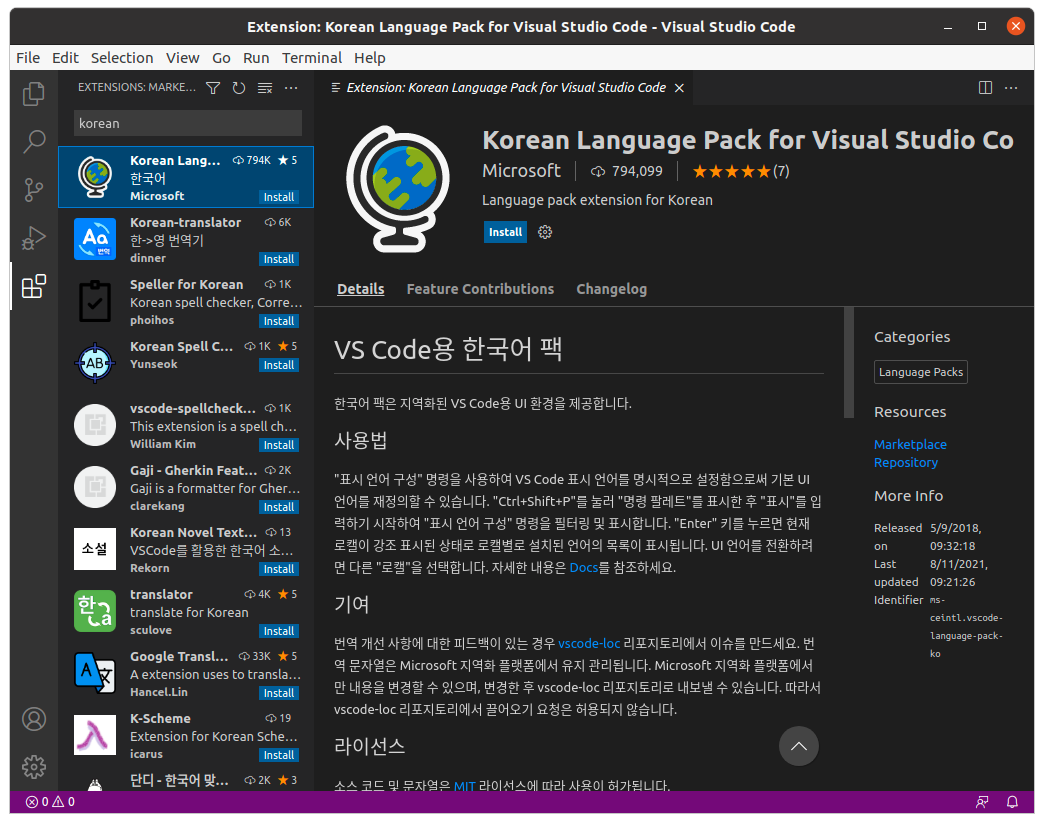
'C/C++'를 검색하여 C/C++ 컴파일러를 설치한다.

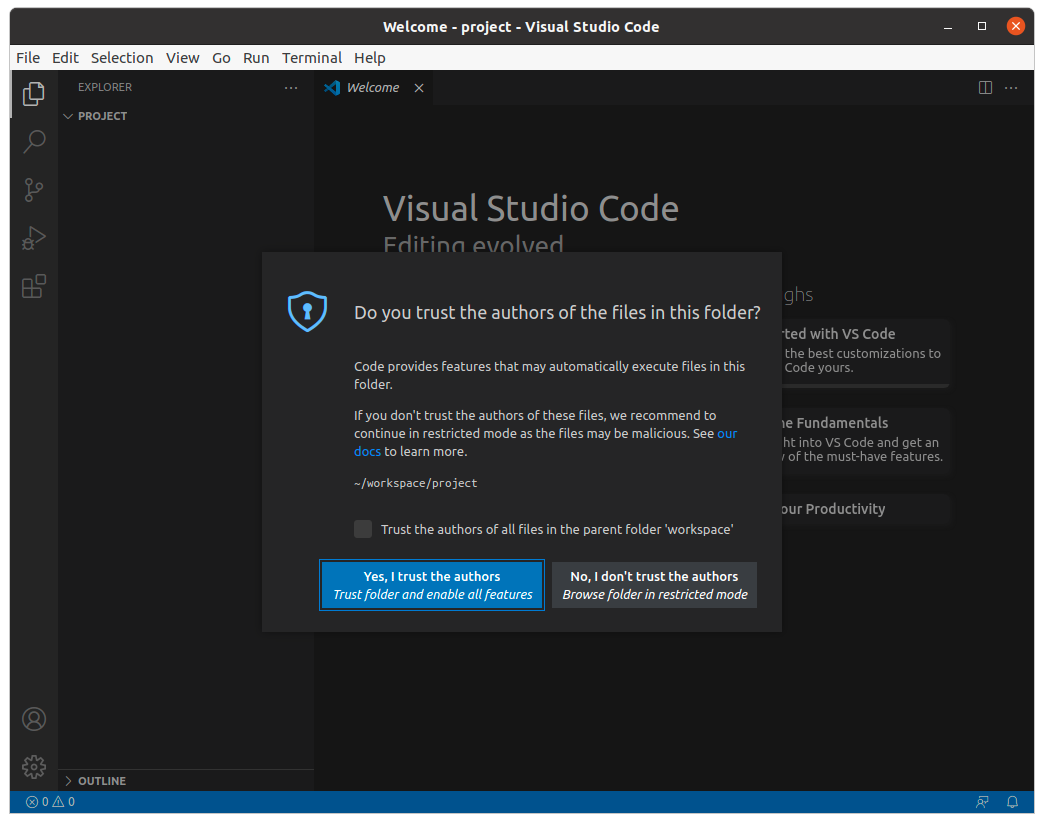
Ctrl+Shift+E를 눌러 작업폴더를 선택합니다. 선택후 폴더를 신뢰할 것인지 묻는 화면이 나오면 선택하시면 됩니다.
3. C/C++ 예제코드 컴파일
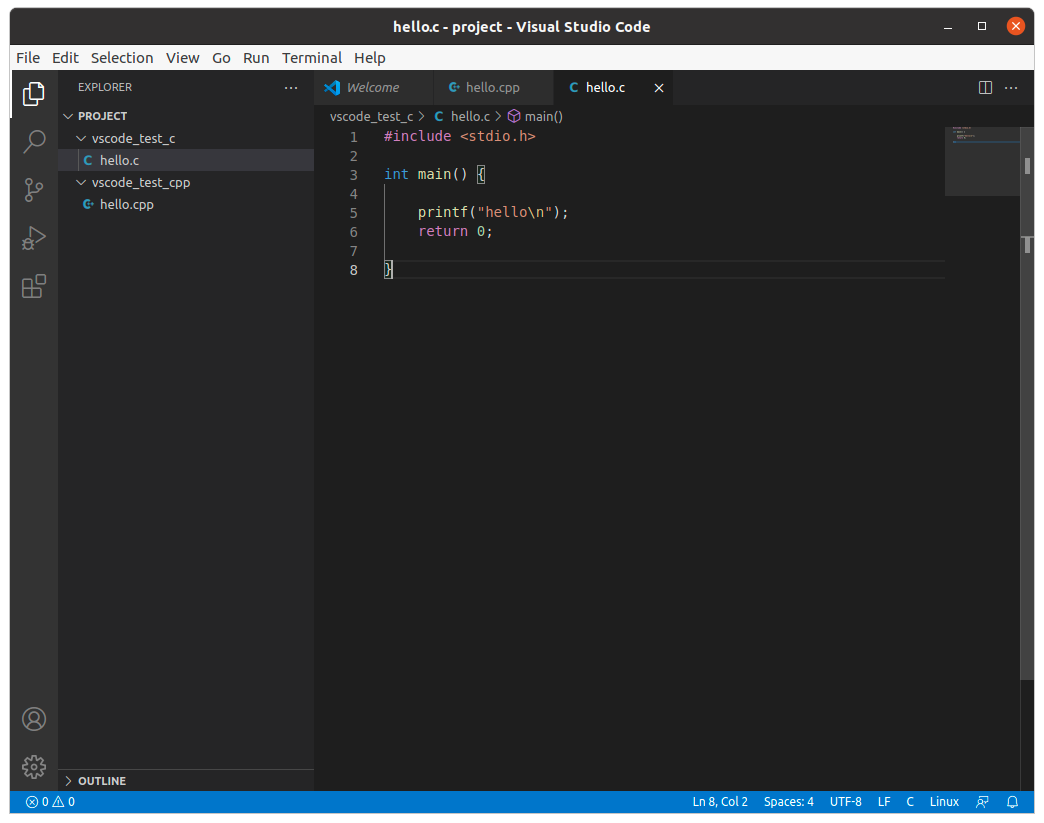
새로운 파일을 만들고, C/C++ 코드를 아래와 같이 작성한다.

Ctrl+Shift+P 를 눌러서 C/C++ edit configuration(UI)를 선택하면 IntelliSense Configuration이 나타난다.
아래와 같이 설정을 해준다.
- Compiler path :/usr/bin/g++
-Intellisense mode: linux-gcc-x64
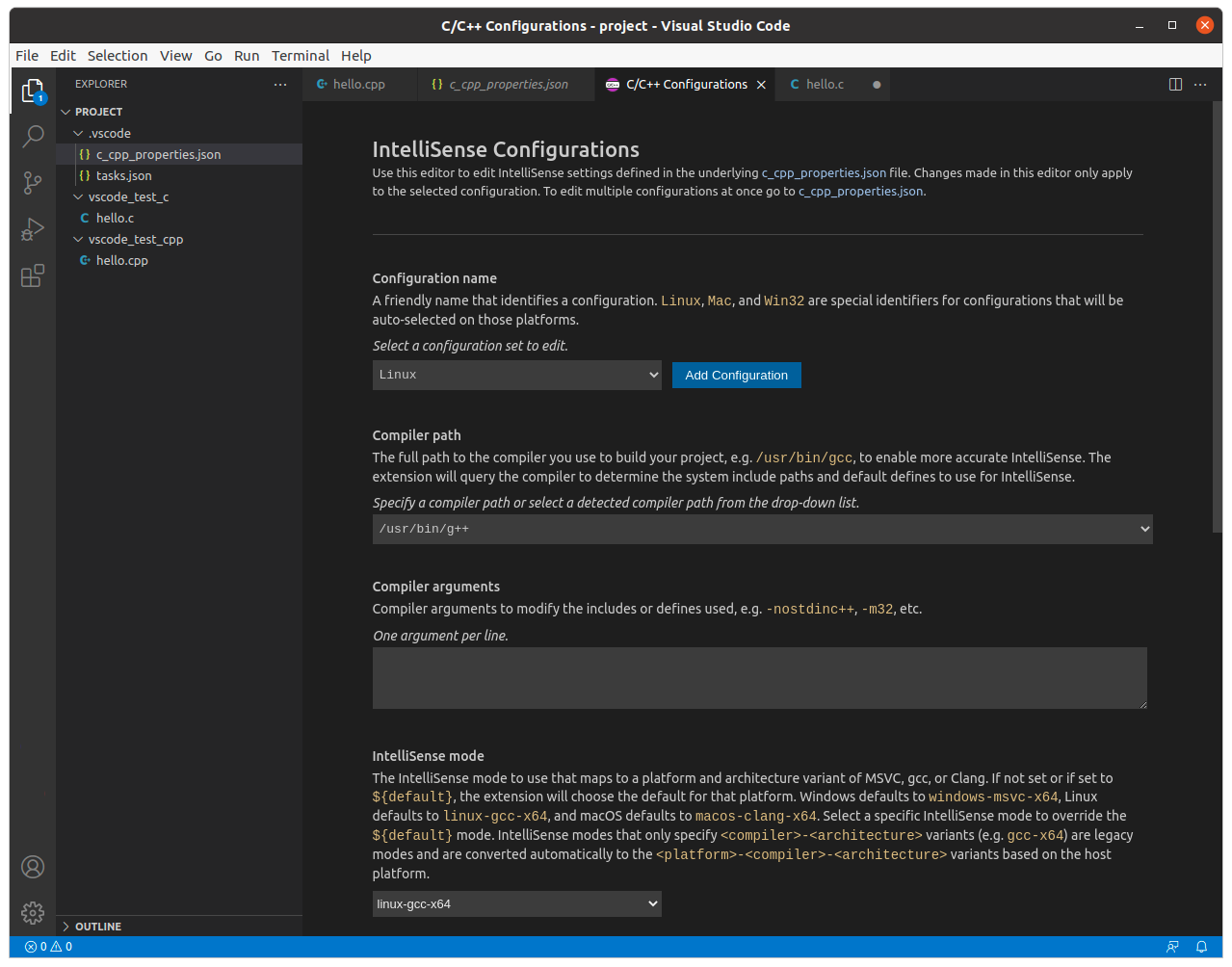
설정을 완료하면 .vscode 폴더에 c_cpp_properties.json이 생성된다.

Terminal -> Configuration Tasks 에서 create tasks.json 파일 생성하기를 선택한다. 선택하면 oters를 선택하고 tasks.json이 생성되는데 파일내용을 무시하고 아래와 같이 수정해준다.
{
   "version": "2.0.0",
   "runner": "terminal",
   "type": "shell",
   "echoCommand": true,
   "presentation" : { "reveal": "always" },
   "tasks": [
         // C++ 컴파일 (C는 아래쪽에서 설정)
         {
           "label": "save and compile for C++",
           "command": "g++",
           "args": [
               "${file}",

               "-o",

               "-g",

               "${fileDirname}/${fileBasenameNoExtension}"
           ],
           "group": "build",

           // 컴파일 시 에러를 편집기에 반영
           //참고: https://code.visualstudio.com/docs/editor/tasks#_defining-a-problem-matcher

           "problemMatcher": {
               "fileLocation": [
                   "relative",
                   "${workspaceRoot}"
               ],
               "pattern": {
                  // The regular expression.
                  //Example to match: helloWorld.c:5:3: warning: implicit declaration of function 'prinft'
                   "regexp": "^(.*):(\\d+):(\\d+):\\s+(warning error):\\s+(.*)$",
                   "file": 1,
                   "line": 2,
                   "column": 3,
                   "severity": 4,
                   "message": 5
               }
           }
       },
       // C 컴파일
       {
           "label": "save and compile for C",
           "command": "gcc",
           "args": [
               "${file}",

               "-o",

               "-g",

               "${fileDirname}/${fileBasenameNoExtension}"
           ],
           "group": "build",

           //컴파일 시 에러를 편집기에 반영
           //참고: https://code.visualstudio.com/docs/editor/tasks#_defining-a-problem-matcher

           "problemMatcher": {
               "fileLocation": [
                   "relative",
                   "${workspaceRoot}"
               ],
               "pattern": {
                  // The regular expression.
                  //Example to match: helloWorld.c:5:3: warning: implicit declaration of function 'prinft'
                   "regexp": "^(.*):(\\d+):(\\d+):\\s+(warning error):\\s+(.*)$",
                   "file": 1,
                   "line": 2,
                   "column": 3,
                   "severity": 4,
                   "message": 5
               }
           }
       },
       // 바이너리 실행(Ubuntu)

       {

           "label": "execute",

           "command": "cd ${fileDirname} &&./${fileBasenameNoExtension}",

           "group": "test"

       }
   ]
}
빌드하려는 코드를 선택하고 Terminal -> Run Task를 선택한다.
그러면 tasks.json에서 미리 선언된 C, C++, excute의 명령어가 나타나는데 C++ 코드를 빌드하려면 save and Compiler for C++을 선택하면 코드가 빌드가 된다.
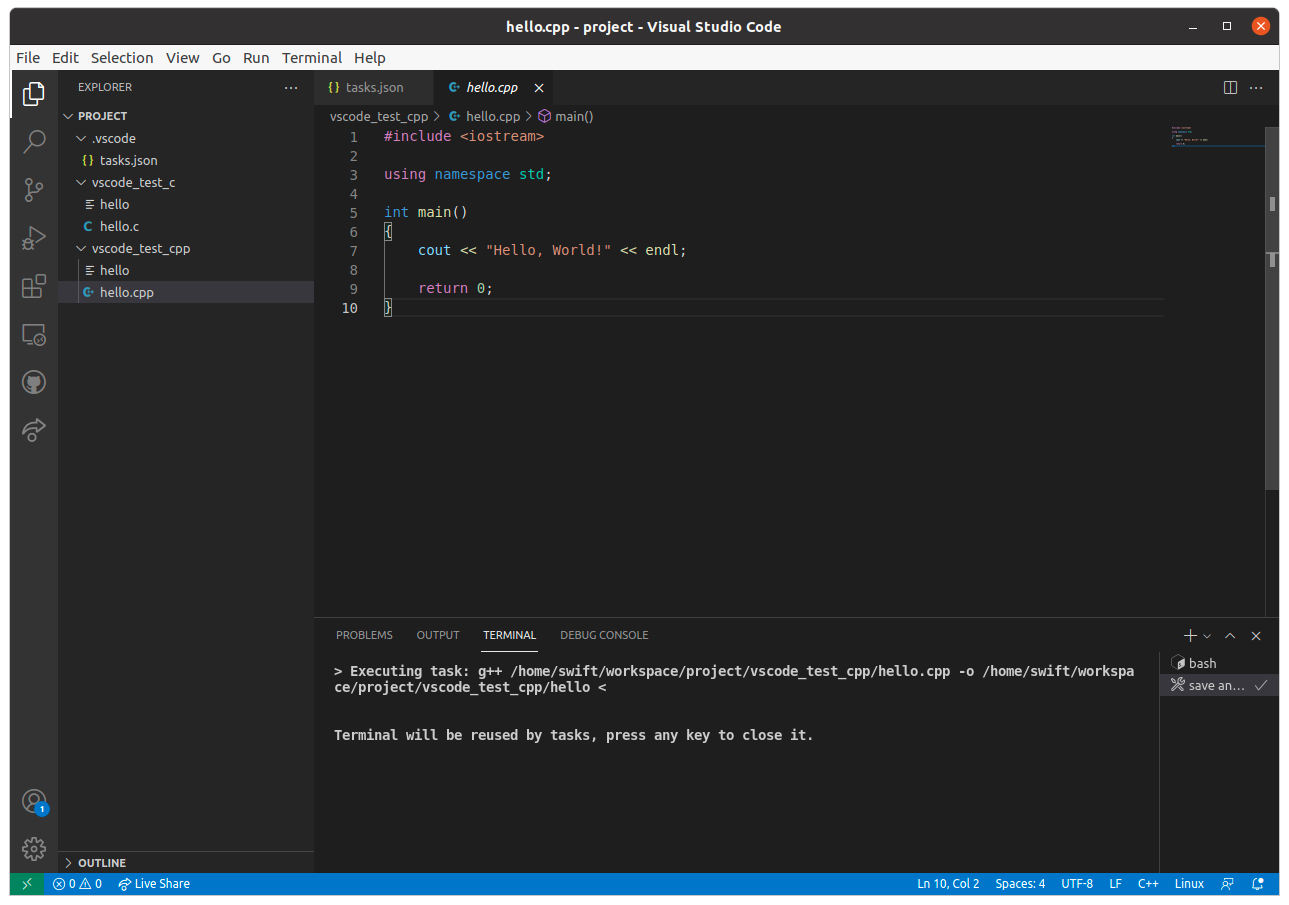
hello.out파일이 생성된 것을 확인할 수 있다.
파일을 실행하려면 다시 Run Task에서 excute를 실해하면 결과를 확인할 수 있다.

5. C/C++ 샘플코드 디버깅
F5를 눌러서 디버깅시 C++(gdb/lldb)를 선택하고 그 뒤 이어 나오는 컴파일러는 /usr/bin/g++을 선택한다.

실행결과 아래와 같은 launch.json 파일이 생성된다. 여기에는 excute로 파일 실행시 gdb를 이용해서 디버깅 가능하도록 필요한 변수들을 설정해 놓았다.
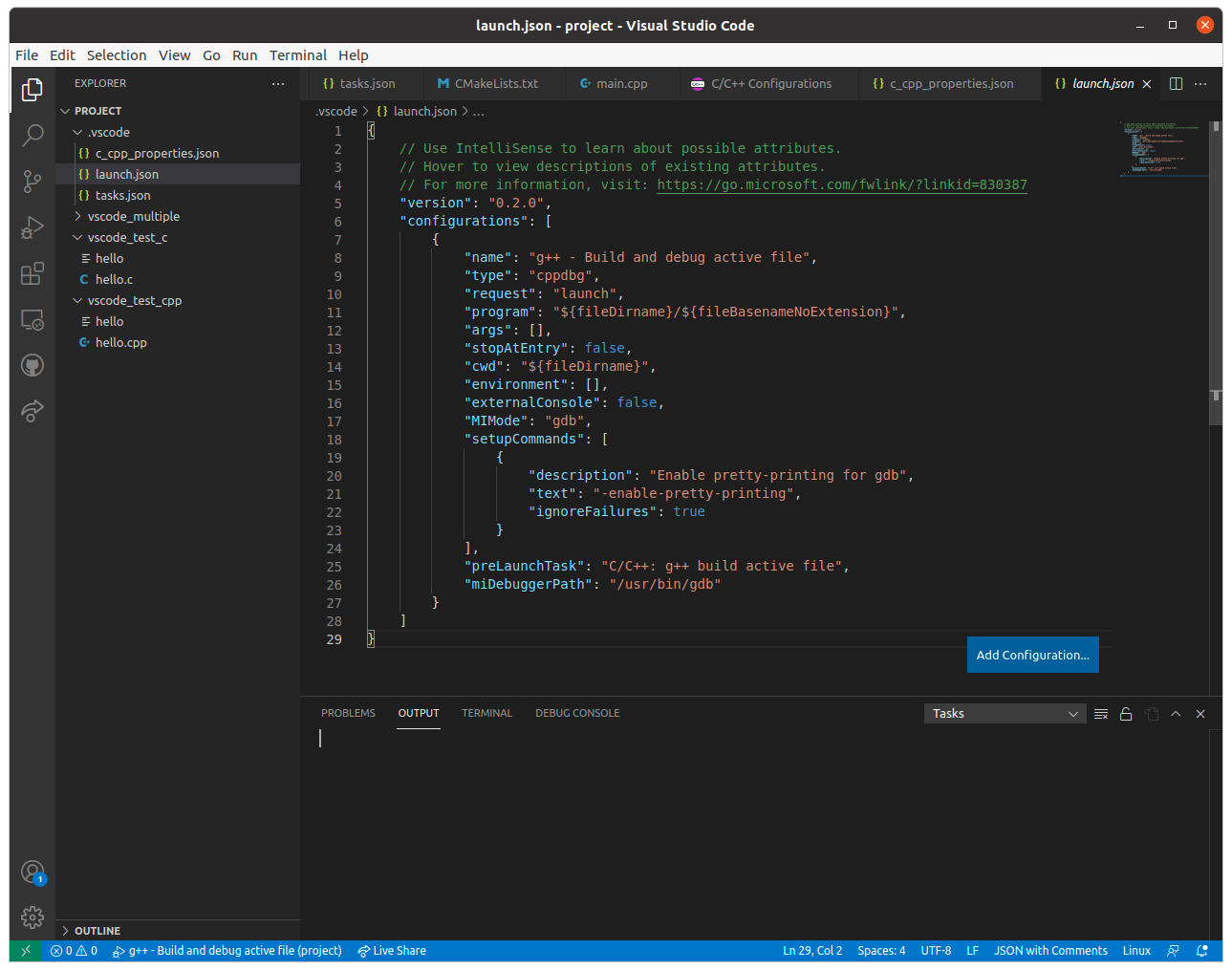
그리고 툴이 실행되면서 break point를 잡은 곳에서 멈춰 디버깅이 가능한 상태가 된다.
